Hosting Update 2025
It’s been almost a year since I restarted my self-hosting journey, and I finally feel like my setup is in a “good enough for now” state to share.
Hardware
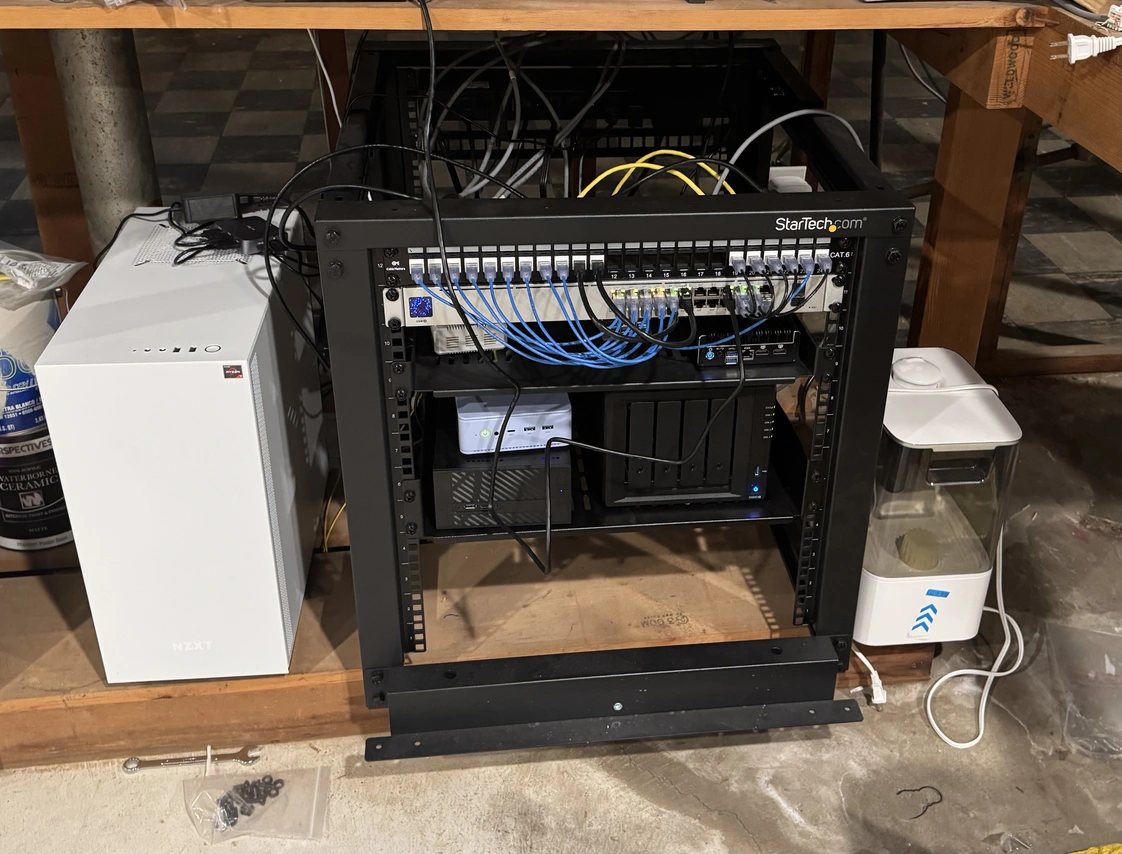
My server rack in my basement containing all my self hosting hardware
Currently, I’m using the following hardware to host my services:
- Asrock DeskMini X300 w/ Ryzen 3400G 4-core/4-thread CPU, 16GB ram, and 1TB md-RAID 1 SSD storage AKA DeskMini
- GMKTec M5+ Mini PC w/ Ryzen 5825U 8-core/16-thread CPU, 32GB ram, and 1TB md-RAID 1 NVME m.2 storage AKA ProxMox
- Synology 920+ NAS w/ 4x4TB HD in md-RAID5 equivalent AKA NAS.
- Home Assistant Yellow w/ PI CM4 4GB, and 500GB m.2 NVME storage
- Gaming PC w/ Ryzen 5800XT 8-core/16-thread CPU, 32GB ram, Nvidia 3080 GPU, and 5TB total NVME m.2 Storage AKA Streaming
First, the NAS is my primary storage server, where I store all my photos, documents, backups, and music. The only self-contained services it provides are Synology’s photo/video backup solution and a wiki that I mainly use for storing recipes. It is also the backup target for the three other servers. The NAS itself backs up to Synology’s cloud storage and an off-site NAS at my parents’ house. While it can be a competent self-hosting platform, I try to keep it more as an appliance.
Make Your Rotating Sandwich 3-D!
I’ve slightly modified my anaglyph demo to accept GIFs of rotating sandwiches and turn them 3-D. Note that the video direction is the direction that the camera is going, not the rotation of the sandwich. If the sandwich is rotating clockwise, set the direction to counter-clockwise and if it is rotating counter-clockwise, set the direction to clockwise. Rotating Sandwiches is my preferred source of rotating sandwiches, but you can use your own source. Download a rotating sandwich from that website, upload it to this form, set the correct direction, pick your preferred color, and submit. Processing can take some time so be patient.
3d Rotating Sandwiches
These are sandwiches… that rotate… in 3-D. You will need a pair of Red/Blue 3d glasses to view these GIFs properly.
Credit for the original GIFs: Rotating Sandwiches


Whole Home Audio from Scrap
Due to technical difficulties, I’m postponing my Anaglyph series. In the meantime, I want to discuss how I built my whole-home audio system (mostly) from scratch.
A few years ago, multi-room and whole-home audio was limited to wealthy homeowners and DIY audio enthusiasts. However, the rise of Sonos and the ever-decreasing price of embedded computers have transformed multi-room audio from a status symbol to a common feature in wireless speakers and AV receivers. It is now so commonplace that many people overlook it when buying home audio equipment. Unfortunately, there is no standard for synchronized multi-room audio, so setting up a whole-home audio solution usually requires buying into a specific and expensive ecosystem. I had a problem with this expense because I lost my job during the recent Lexmark layoffs. Luckily, multiple open-source solutions allow a more tech-savvy user like myself to hack together a whole home audio solution with off-the-shelf components.
96 Hours
I don’t usually associate my home networking setup with the words “simple,” “flexible,” or “easy.” However, that changed when I lost internet access for an extended period. Last Thursday, I came home from a round of golf to find my internet access gone. I had assumed this was due to a mistake with my ISP’s scheduled maintenance that they were performing that day. As a software engineer, I understand how simple maintenance tasks can turn into unexpected outages; I decided to get some sleep and deal with it the next day.
Anaglyph Update
Before writing up the first two parts, I wanted to post a few samples since I’ve already created a proof-of-concept anaglyph generator for part 3 of my 3-D series. Like most anaglyph generators, my program combines a left and right image into a 3-D anaglyph. Unlike other anaglyph generators, my program can take a video from a 360 photo booth (or any other arc shot) and turn that into a 3-D video. So far, this only works when the camera moves in the same direction throughout the video. The code I wrote for this experiment is on my GitHub profile.
March Updates
Now that I am searching for jobs, now is an excellent time to update you on the personal projects I have worked on for the past few months. These posts will provide insight into my thought processes and odd collection of skills and interests.
First on the docket is my sporadic, multi-year journey into DIY 3D pictures and videos. Unlike traditional 3D media that uses two synchronized cameras, I am attempting to use just one camera. The first technique uses a custom-made filter for a specific lens to produce anaglyphs with just a single click of the camera. The second technique uses a psychophysical phenomenon known as the Pulfrich effect to trick the human brain into interpreting a standard 2D video as three-dimensional. Finally, I’ll demonstrate a third technique that uses a simple script to combine elements of the first two techniques. As a side note, I am in discussions with a local business about using what I’ve learned as part of a small social media marketing campaign.
Disappointing Xmas Lights
Like Alec from Technology Connections, I’ve been trying to find the perfect set of LED lights to hang outside for Christmas. We have independently been attempting to find colored LED strands that don’t look like RGB gamer puke. Almost all colored LED strands use monochromatic diodes and only have colored sleeves for decoration. This creates a garish, headache-inducing blob of light with a harsh blue cast. The solution to this problem is simple, obvious, and cheap, but none of the large companies seem to care.
Home Assistant #2
It has been a week since I have been running Home Assistant and I have some thoughts. So far, it has been a good experience with a few issues that aren’t technically Home Assistant’s fault.
My most frustrating issue is that most of my Aqara Zigbee devices stop connecting to the Zigbee hub. It appears that any Aqara end device connected to the hub works as expected, but Aqara devices that try to use my Sylvania smart plug as a router stop working after an hour or two. Based on my research online, I believe this is due to Aqara’s non-standard Zigbee implementation which prevents messages from traveling through a Zigbee mesh network. I will try replacing the Sylvania plug with one from Aqara to see if that changes anything.
Home Assistant #1
Now that I own my own home, I have decided to make a second effort at setting up a smart home. Like the last time, I have decided to go with Home Assistant as my platform of choice. Unlike last time, I hope to create automations that are actually useful.
To simplify the overall setup, I’m using the Home Assistant Yellow and a Raspberry Pi CM4 (4GB model) to host Home Assistant. The built-in Zigbee, M.2 slot, low power consumption, and community made this an easy choice. I would have preferred to get the Power over Ethernet version, but that was heavily back-ordered.