Hosting Update 2025
It’s been almost a year since I restarted my self-hosting journey, and I finally feel like my setup is in a “good enough for now” state to share.
Hardware
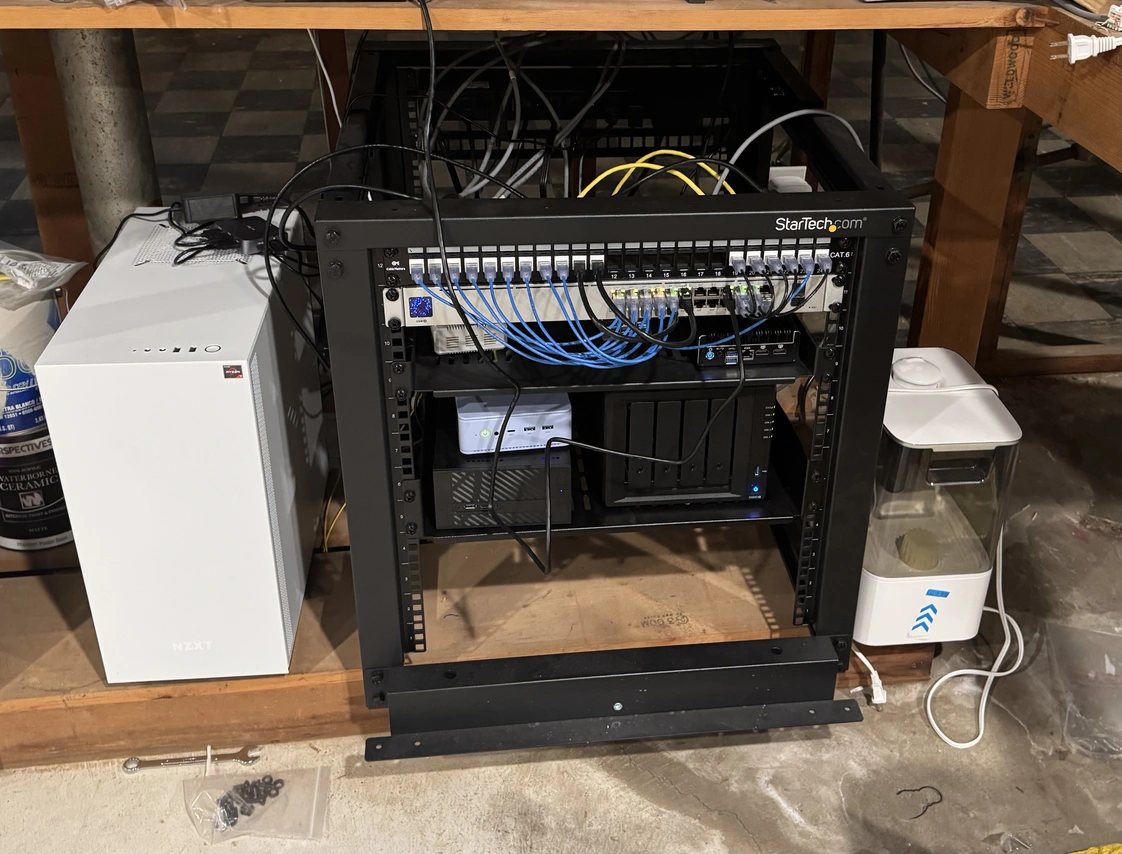
My server rack in my basement containing all my self hosting hardware
Currently, I’m using the following hardware to host my services:
- Asrock DeskMini X300 w/ Ryzen 3400G 4-core/4-thread CPU, 16GB ram, and 1TB md-RAID 1 SSD storage AKA DeskMini
- GMKTec M5+ Mini PC w/ Ryzen 5825U 8-core/16-thread CPU, 32GB ram, and 1TB md-RAID 1 NVME m.2 storage AKA ProxMox
- Synology 920+ NAS w/ 4x4TB HD in md-RAID5 equivalent AKA NAS.
- Home Assistant Yellow w/ PI CM4 4GB, and 500GB m.2 NVME storage
- Gaming PC w/ Ryzen 5800XT 8-core/16-thread CPU, 32GB ram, Nvidia 3080 GPU, and 5TB total NVME m.2 Storage AKA Streaming
First, the NAS is my primary storage server, where I store all my photos, documents, backups, and music. The only self-contained services it provides are Synology’s photo/video backup solution and a wiki that I mainly use for storing recipes. It is also the backup target for the three other servers. The NAS itself backs up to Synology’s cloud storage and an off-site NAS at my parents’ house. While it can be a competent self-hosting platform, I try to keep it more as an appliance.
The Streaming PC is a gaming PC running Bazzite that acts as a personal “cloud gaming server.” It does not run continuously and is instead turned on via a Wake-On-Lan packet. It contains the most powerful GPU out of my four gaming capable computers and since it resides in the basement, I can crank the fans without worrying about noise.
Next, the DeskMini has been playing a diminishing role in my setup. While its processing power and RAM are sufficient for pretty much all my needs, the single network port has limited its usefulness. I use multiple VLANs and firewall rules on my pfSense router to isolate groups of devices and services for security. While it is possible to configure the single port to be VLAN aware, it isn’t worth the risk of misconfiguration. It runs Debian 12 with Portainer, which is a container management solution.
The Home Assistant Yellow box runs Home Assistant in the untrusted IoT network.
Finally, the GMKTec is a Proxmox server that runs everything else. While more than powerful enough for 99% of self-hosting needs, the dual network ports make this server the most versatile machine I have. The first network port is used for the management interface and a few services, while the second is VLAN-aware. This allows containers and VMs to run in whichever VLAN I need.
Access
For security reasons, I have decided not to allow direct external access to any of my services, at least for now. While at home, accessing my services is straightforward. I have a reverse proxy (Caddy) running in a container that handles all services I access via https://
While away from home, I can access the services on my home network using either a full-tunnel WireGuard VPN or Tailscale. My pfSense router runs a WireGuard peer which acts as a server, allowing me to access my network as if I were at home. Since it is a full-tunnel VPN, all my traffic is encrypted and tunneled through my home network. This means I get DNS-based ad-blocking and a bit of extra security when I am away from home. The main downside to this setup is increased latency. If I am on a network using the same ISP as I do, the additional latency is negligible. However, if I am using cellular or on a network with a different ISP, the added latency can be up to 100 milliseconds. While not a big deal, the added latency can make normal web browsing feel sluggish. Additionally, granting another device access to the WireGuard tunnel requires manual configuration via command-line tools and direct access to the pfSense web UI. These downsides bring me to Tailscale.
Unlike Wireguard, Tailscale handles most of the work, adding a new device to my Tailscale network (tailnet). While Tailscale uses WireGuard under the hood, it also provides ways to connect devices without having to set up port forwarding on my router. Before receiving a static IP address from my ISP, I was behind a CGNAT, which prevented direct connections from outside the house. Connections would instead go through a relay server, which greatly increased latency and significantly reduced bandwidth. While it was perfectly fine for most use cases, it wasn’t quite good enough for a few. Once I received a static IP and configured hybrid NAT on pfSense, I was able to make direct connections to machines running Tailscale in my house (including the Caddy reverse proxy) from the outside.
Typically, having multiple services for external access would unnecessarily complicate things. I’ve found that these two methods don’t interfere that much with my current setup.
DNS
While accessing services on my local network (or through the full tunnel VPN), DNS is straightforward. There is an entry in my pfSense DNS resolver that points any request to *.internal.topher.ward to the IP address of my Caddy reverse proxy. When connecting using Tailscale, things are a bit more interesting. Tailscale nodes are typically assigned private IP addresses in the 100.0.0.0/8 range. Instead of forcing all DNS requests through my Tailscale network, I added a public A record that resolves *.internal.topher.ward to the private Tailscale IP address of the Caddy reverse proxy.
Services
Below are the services I have running that are in regular use:
- Caddy reverse proxy (Cloudflare plugin handles TLS certificates)
- Karakeep (bookmarks)
- Ollama (generate tags for Karakeep)
- Navidrome (music)
- Home Assistant
- Whisper STT for Home Assistant
- Piper TTS for Home Assistant
- LibreSpeed
- Gist
- Upsnap
- Sunshine for “Cloud” Game Streaming
- Restic Rest Server
- Wireguard VPN
- pfBlocker-NG
Additionally, I have a few services running that I use sporadically.
- Kasm Workspaces?
- Restreamer
- RustDesk
- AzuraCast
- Gitea
- Drone CI/CD
Closing thoughts
Eventually, I would like to start self-hosting publicly available services again (like this website), but I’ll have to rethink my security approach first. Additionally, I may completely transfer everything on DeskMini to a VM on Proxmox. Not only will this move simplify my setup, but it will also provide a good way to test my current backup strategy.